Showing posts with label Linux. Show all posts

Understanding even the most complex shell commands

https://yalneb.blogspot.com/2019/06/explainshell.html

The website explainshell.com has a very simple goal: enter any shell command and it will explain the string bit by bit. It is extremely useful if you are starting out with Linux and still don't know your way around the terminal, but it is still quite handy for more advance users.

Take the following shell command: echo "YALNEB.BLOGSPOT.COM" | sed 's/LO.*T/y/g;s/COM/Andres/g' | tr '.' ' '. It is quite ugly to look at, but all it does is print: YALNEB By Andres. How? Well, it's really simple! Take a look at the explanation and you will see how ingenuous this script actually is ;)

Audiophiles on Linux, rejoice

https://yalneb.blogspot.com/2019/04/pulseeffects-autoeq.html
PulseEffects screenshot taken from their official git repo

Suppose your an audiophile (at least level 2) and want to fine-tune your equalizer to improve your headphones play back on Linux. You are after that super clean and real-life-like flat response where the bass sounds realistic and the mids are super crisp. How to you go about it?

Well, there are many ways. But if you combine PulseEffects, a system wide parametric equalizer with GUI for Linux, and AutoEQ/Results, a huge database of precalibrated headphones, you will be set in less than 5 minutes.

Bash terminal greeter

https://yalneb.blogspot.com/2019/04/bash-terminal-greeter.html

Wouldn't it be nice that every time you open up a terminal (or log in remotely), you would be greeted by a general overview of your system's health? Well, with this tool you can address this very problem.

This is a simple bash script that displays on top of new terminals a simple summary of your system's specs (useful if its a remote machine you just logged in) and a summary of your systems current load. Moreover, if the load is high, the color will change to draw your attention quickly, and when possible, will display what is causing the problem. Such as a report of CPU hungry processor an error report if a systemctl service has failed to load.

Improved ls command to list your linux files.


If you use Linux on a daily basis, then you probably run the 'ls' commands several times a day to list files. This is one of the most used commands on Linux (aside from 'cd') and still, it is sometimes a mess. With the following script, you can "wrap" the normal 'ls' command to:
  1. Highlight folders with colors, to better distinguish them from files.
  2. Sort folders before regular files
  3. Sort hidden folders and hidden files last
  4. Print information in a human-readable format

Fancy bash prompt with colors

Read full article: Fancy bash prompt

I got bored of the normal bash promt a long time ago, which lead me to configure my .bashrc to betther highlight terminal inputs. Still, I used to see some terminal on the net with a very fancy looking bash promt that I found really appealing. After some googling I decided to give it a go and try to generate my own. All it takes is a fancy triangle character to create the colored overlaps, shown in the above figure, and some tweaking. All in all, the end result speaks for itself.

Check out my implementation after the break, and leave a comment if you like it or want to make some suggestions to further improve it!

Update: a new and easy to install version can be found here.

Delete songs from HDD while listening to them on audacious

http://yalneb.blogspot.com/2017/05/audacious-delete.html


I digitalized my old CD music collection a (very) long time ago. And the other day ,listening to it, I stumbled over some tracks I did really not like. I used to simply ignore them (unless I was willing to stand up and press the next track on my Hi-Fi), but the time has come to... delete them!

In this post I want to share a small script that can be bound to any key combination on your keyboard. When a song comes up that you don't like, simply invoke it and it will not only move the current song to the trash (you don't want to listen to it forever, right?) but also delete it from Audaciou's playlist.

TMUX: useful key-bindings

http://yalneb.blogspot.com/2017/05/tmux-useful-key-bindings.html

Continuing my TMUX series, this post will show you some useful keybindings which will make you much more productive, not only when working with TMUX, but also while configuring it to your liking.

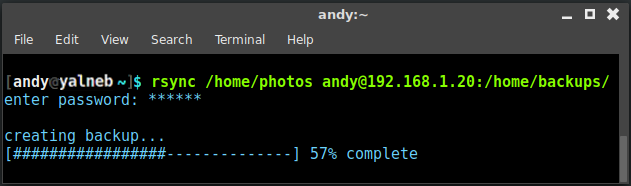
rsync: copy files the intelligent way

http://yalneb.blogspot.com.es/2017/05/rsync.html

You probably heard about last Friday's massive cyber attack that affected millions of outdated machines that still run Windows XP, but also newer version. Luckily the pandemic got halted almost by sheer luck (read more at hackaday).

Anyway, it could have affected any of us (maybe dual-boot?), which alerted me of the fact that I had not backed up my files for quite some time now. This gave me two options. Either plug in my external backup HDD and copy everything with my file browser (overwriting old files), or do it the intelligent way: an incremental update to my backup with rsync to only copy modified files.

Guns Of Icarus Online: weapons chart

http://yalneb.blogspot.com/2017/04/guns-of-icarus-online-weapons-chart.html

Guns of Icarus Online is a steampunk-themed video game based on a new concept of cooperation. You and your friends share an armed airship and have to fight enemy for fun and glory, but instead of controlling your vessel directly, you have to move to the different components to steer the ship (helm), keep your ship airborne (balloon, engines, etc) and run from turret to turret during intensive air battles and dogfights. The game is very fun and really stands out from other video games in the way it works on cooperative team playing.

Run Linux shell commands sequentially

http://yalneb.blogspot.com/2017/02/run-linux-shell-commands-sequentially.html

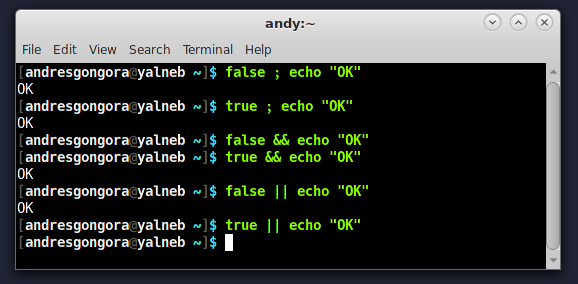
It is possible to concatenate Linux shell commands using either && or || or ;.
  • && Run second command if the exit status of the first command is successful.
  • || Run second command if the exit status of the first command is not successful.
  • ; Run second command no matter what the exit status of the previous command.
As shown in the figure above, this can become very handy to concatenate Linux commands depending on their exit status, specially if the first command is rather slow and you do not want to wait for it to finish. For example, I use && all the time to compile some source code from the terminal and run it as soon as it finishes.

Note that you can run an arbitrary long number of commands sequentially, so go out and play while you leave your workstation finish a batch of commands.

Fix a messed up terminal

http://yalneb.blogspot.com/2016/05/fix-messed-up-terminal.html

In the last ten years I have encountered this situation over a broad spectrum of distribution and terminal: line wrapping gets totally messed up and starts erasing and mixing with the previous line. And although the terminal still executes the correct commands and not the mashup it is showing, it is quite frustrating.

TMUX: better mouse support

http://yalneb.blogspot.com/2016/05/tmux-better-mouse-integration.html


Continuing my TMUX series, this time we will add better mouse support to your TMUX. (I also works over SSH if your local machine has a mouse).

You will add following functionality to your mouse:

  • Resize panels draging on borders
  • Select active panel with left click
  • Zoom panel with right click
  • Create window with right click on status bar
  • Drag and interchange panels
  • Drag windows
  • Close panels with mouse-wheel click
  • Close windows on the status bar with mouse-whell click

TMUX: sleek theme

http://yalneb.blogspot.com/2016/05/tmux-sleek-theme.html

I have talked about TMUX in my previous post. It is an awesome tool that can increase your productivity exponentially. How ever, it is extremely ugly and distracting if you use the default theme.

It is difficult and very subjective to explain something visual, but I have come up with a simple, minimalist, futuristic and sleek theme that works great whether your terminal supports 256 colors, or only 16.

Do not worry, you can install my theme in less than 15 seconds and enjoy it right away.

TMUX: get some juice out of your terminal

http://yalneb.blogspot.com.es/2016/05/tmux-get-some-juice-out-of-your-terminal.html

TMUX is sysadmin's black magic.

If you ever had to remotely log into one fo your servers (or even your raspberryPi), you know how annoying it is when you want several terminals: either you open locally several terminals and log in each of them over SSH, or you simply surrender.

In the same context, I am sure you had to run a lengthy command on the remote machine, but could disconnect because that would kill the remote process nor change from one computer to another while sharing the remote session.

If you identify your self with this, then call 555-get-me-tmux and order now! (or better yet, continue reading)

Dotfiles: sync your linux configuraiton

http://yalneb.blogspot.com.es/2016/05/dotfiles-sync-your-linux-configuraiton.html

Dotfiles are how you personalize and configure your system. Be it your bashrc file where you write your favorite aliases or run scripts, or your program's user configuration.

Instead of reconfiguring each of your machines independently, you could manually copy all dotfiles from one to another. Or... you could sync your dotfiles to github and use this simple script to link them in place.

Reduce eye strain and insomnia when working at night with F.lux and Redshift

http://yalneb.blogspot.com/2015/08/reduce-eye-strain-and-insomnia-when.html

For thousand of years our days have been scheduled by the sun, so it is no surprise that our biological clock can be directly affected by the amount of light we get. Yet, our bodies can not differentiate sun light from artificial light, and in our modern societies we are surrounded by the later until the very last minute we go to sleep.

Melatonin is the hormone that tells our body when it is time to sleep, but it secretion can be affected by exposure to bright light, specially blue light of which we get a lot during day time, while red light, like that for example of sunsets, does not hamper our sleep cycle. The effect of light on our daily cycles has been studied by Harvard among others.

In this post I am going to talk about software to automatically reduce the amount of blue in your screen without you even noticing it according to the time of day. Remember that screens produce any color by mixing red, green and blue light sources.

7.1 surround sound on Linux

I was having trouble setting up surround sound on a PC with an integrated Realtek HD Sound Card ALC898. My problem was that although I had a 7.1 soundcard and a 7.1 sound system, not all my speakers where playing.

After checking pulseaudio I noticed that my soundcard was detected only as 5.1 compatible but with two audio inputs, so I was left with the task of turning one of the inputs jacks into an output (preserving one of the inputs for my microphone).

Solving Antergo's "Signature is unknown trust"

Antergos is a Linux distribution based on ArchLinux, in a similar fashion of how Ubuntu is based on Debian.

If you are using Antergos, you will have noticed errors due to wrong or unknown authentication keys when performing a full-system update, with an error message similar to "Signature is unknown trust". Luckily this is quite simple to solve.

C++ debugging macro


Debugging is a must when coding, regardless of how big or complex a project is. And althought there are tons of debugging tools out there, most are overpowered for my needs or simply introduce unnecessary code  even when in the release version.

Lightweight C++ logging class for Linux


Logging is not only a powerful debugging and maintenance tool, but also a basic security  element. In this case I wanted to save telemetry data of a multirotor without sending it to my laptop. Thus I wrote a simple logger that stores everything on the on-board uSD card. Although it's not perfect, it has proven to work as expected and be quite lightweight.